Multi-Agent AI Systems: How Teams of AI Agents Work Together
A multi-agent AI system splits one goal across several specialised agents that plan, act and check each other’s work. It pays off when the work breaks into independent parts, and it adds cost and complexity when agents must share one tightly coupled context. Start with one orchestrator and a few narrow workers, measure…
- A multi-agent AI system splits one goal across several specialised agents that plan, act and check each other’s work.
- It pays off when the work breaks into independent parts, and it adds cost and complexity when agents must share one tightly coupled context.
- Start with one orchestrator and a few narrow workers, measure the result, and add structure only where you can show it helps.
Most teams start with a single AI agent: one model, a set of tools, and a loop that runs until the task is done. That works well until the task gets wide, long or risky. A multi-agent AI system answers that limit by dividing the work among several agents, each with its own role, tools and context. This guide explains how these systems are put together, how the agents talk to each other, where they work today, and what can go wrong.
What Is a Multi-Agent AI System?
A multi-agent AI system is a group of AI agents working toward a shared goal. Here, an agent is a language model that uses tools in a loop: it decides what to do, calls a tool, reads the result and decides again. Anthropic’s engineering team uses the same definition in its write-up of the multi-agent research system behind its Research feature.
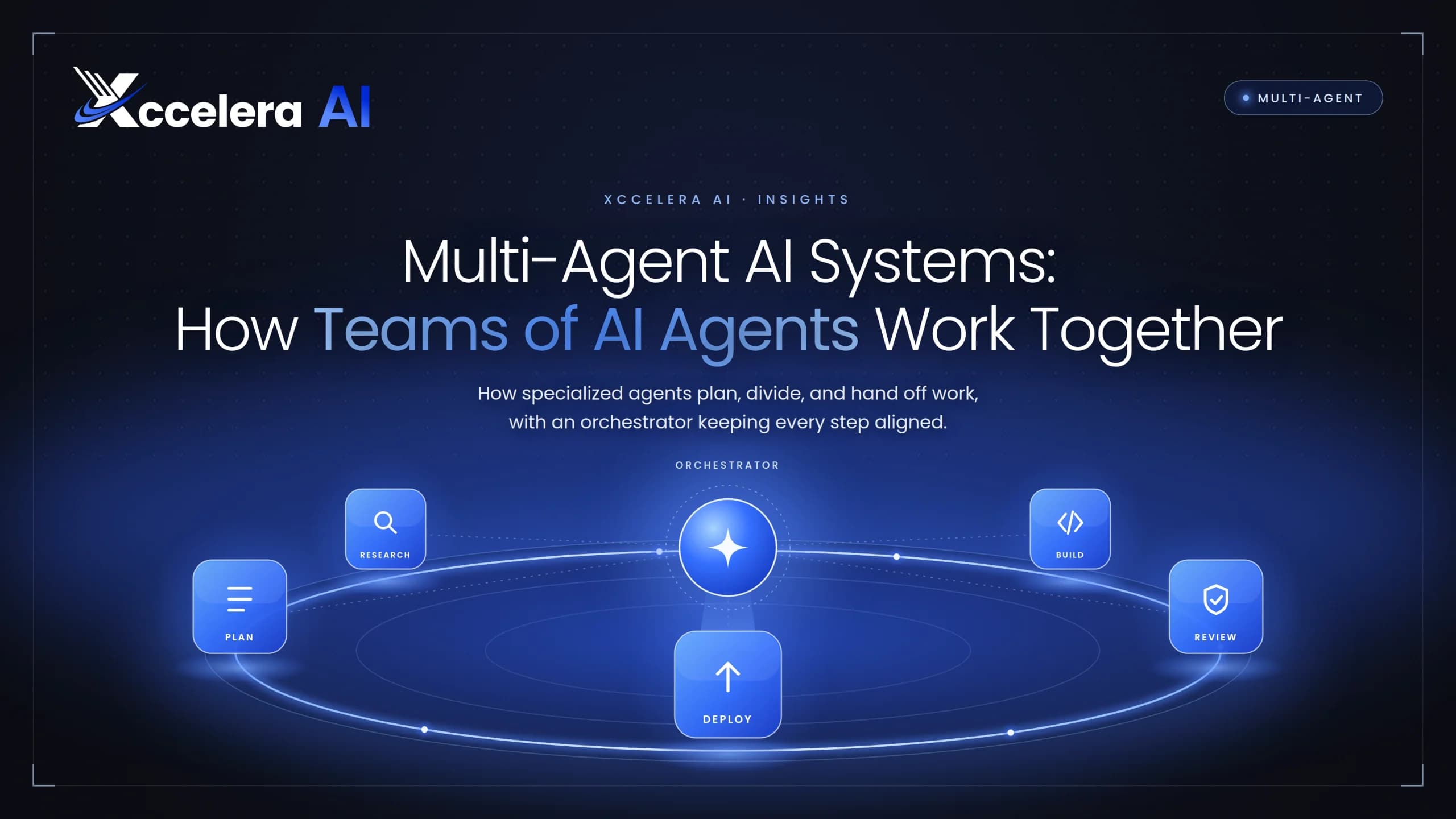
In practice, one agent plans and delegates, others carry out focused subtasks, and a final step merges the results. Each agent has its own instructions, its own tools and its own context window, so no single prompt has to hold everything.
| Dimension | Single agent | Multi-agent system |
|---|---|---|
| Best for | Short, linear tasks with one clear tool set | Wide or long tasks that split into independent parts |
| Context | One window holds everything | Each agent works in its own window |
| Speed | Steps run one after another | Independent steps can run in parallel |
| Cost | Lower | Higher, because several agents each consume tokens |
| Debugging | One trace to read | Many traces plus the hand-offs between them |
| Typical failure | Loses track on long tasks | Agents duplicate work or contradict each other |
Key Terms at a Glance
- Orchestrator
- The lead agent that breaks the goal into subtasks, assigns them and combines the results.
- Subagent (worker)
- A focused agent that handles one subtask with its own instructions and tools.
- Tool
- A function an agent can call, such as a search, a database query or an API request.
- Hand-off
- The moment one agent passes work, context or results to another.
- Guardrail
- A rule or check that limits what an agent may do or accept.
Why a Single Agent Hits a Ceiling
A single agent can only hold so much in one context window, and every extra tool or instruction makes its choices harder. Three limits show up again and again:
- Context overload. Long tasks fill the window with intermediate results, and the agent loses track of earlier details.
- Serial work. One agent explores one path at a time, even when the task has many independent threads.
- Mixed roles. A single prompt asked to plan, research, write and review tends to do each job less well than a prompt focused on one.
Much of the improvement comes from spending more reasoning effort in parallel, across several context windows. That is also why these systems cost more to run.
Core Architecture Patterns
Most designs are variations on a small set of shapes. Choosing among them is mostly a question of how much the subtasks depend on each other.
Orchestrator-Worker
A lead agent plans, delegates and synthesises. Workers run in parallel and report back. This is the most common production pattern, and it is the one Anthropic describes for its Research feature. It suits breadth-first work such as research, due diligence or large-scale document review.
Pipeline (Sequential)
Agents run in a fixed order, each handing its output to the next: extract, enrich, validate, publish. A pipeline is easy to reason about and to test, but it cannot adapt mid-run and it moves only as fast as its slowest stage.
Hierarchical
Orchestrators manage other orchestrators, so each team of agents has its own lead. This scales to large workflows, but every layer adds latency, cost and another place where instructions can get distorted.
Peer Network
Agents talk to each other directly with no central lead. The design is flexible and resilient, and it is also the hardest to predict, debug and keep within budget.
Critic or Reviewer Loop
One agent produces work and another checks it against stated criteria, repeating until the work passes or a limit is reached. Adding a reviewer is often the cheapest way to raise quality.
| Pattern | Use it when | Watch out for |
|---|---|---|
| Orchestrator-worker | The task splits into independent, parallel subtasks | Weak delegation instructions, and a lead that becomes a bottleneck |
| Pipeline | Stages are fixed and each depends on the one before | No way to adapt mid-run, and one slow stage holds up the rest |
| Hierarchical | The workflow is large enough to need team leads | Added latency, cost and instruction drift at every layer |
| Peer network | Agents must negotiate or respond to each other freely | Unpredictable behaviour and runaway cost |
| Critic loop | Output quality matters more than speed | Endless revision cycles without a stop condition |
How Agents Communicate and Use Tools
Two kinds of connection matter. Agents need to reach tools and data, and agents need to reach each other. Two open protocols have emerged for these jobs:
- MCP (Model Context Protocol). Introduced by Anthropic in November 2024. It standardises how an agent connects to tools, data sources and APIs.
- A2A (Agent2Agent). Introduced by Google in April 2025 and later moved to the Linux Foundation. It standardises how independent agents discover each other, delegate tasks and exchange results.
The two are complementary rather than competing. A common setup uses MCP between each agent and its tools, and A2A where agents built by different teams or vendors need to collaborate. Inside a single codebase, plain function calls or a framework’s own messaging are often enough.
What a Good Hand-Off Contains
Delegation quality often decides the outcome. Anthropic reports that vague instructions led subagents to duplicate work or leave gaps, and that each task needs a clear objective, boundaries and an expected output format. A useful delegation message includes:
- The objective, in one or two sentences.
- Boundaries: what this agent must not research, change or decide.
- The output format the lead agent expects back.
- The tools and sources the agent is allowed to use.
- A stop condition, such as a step limit or a confidence threshold.
The loop below shows the control flow in framework-neutral pseudocode. It is an illustration of the idea, not a library you can import.
def run_task(goal, lead, workers, critic, max_rounds=5):
    plan = lead.plan(goal)                        # 1. split the goal
    results = {}
    for step in range(max_rounds):
        tasks = lead.next_tasks(plan, results)   # 2. pick independent subtasks
        if not tasks:
            break
        outputs = run_in_parallel(               # 3. run workers in parallel
            workers[t.role].run(t.objective, t.boundaries, t.output_format)
            for t in tasks
        )
        for t, out in zip(tasks, outputs):
            results[t.id] = critic.review(t, out)   # 4. check before accepting
    return lead.synthesize(goal, results)       # 5. merge checked results
Where Multi-Agent Systems Work Today
The best fits share one trait: the work splits into pieces that can proceed without constant coordination.
- Research and analysis. Parallel searches across many sources, merged into one cited report.
- Customer operations. A triage agent routes each request to billing, technical or account specialists.
- Software delivery. Separate agents for planning, implementation, test generation and code review, with a person approving merges.
- Document-heavy workflows. Extraction, validation and reconciliation across contracts, claims or invoices.
- IT and security operations. Agents that gather signals from different systems and propose a response for review.
Tasks in which every step depends on shared, constantly changing context, such as much day-to-day coding, are a weaker fit today. Anthropic makes this point in its own write-up, and some teams building coding agents deliberately choose a single agent for the same reason.
Split the work only where the pieces can truly run on their own.
Performance and Cost: What the Numbers Show
Anthropic’s published figures show both sides of the trade.
Read these carefully. The 90.2% figure comes from one vendor’s internal evaluation of research tasks, comparing a Claude Opus 4 lead with Claude Sonnet 4 subagents against a single Claude Opus 4 agent. It shows what is possible on a task that parallelises well, not what to expect on yours. The token figures are a reminder that quality is partly bought with compute, so the task has to be valuable enough to justify the spend. Source: Anthropic Engineering, “How we built our multi-agent research system”.
Risks and Trade-Offs
Advantages
- Parallel work shortens the time to finish wide tasks.
- Narrow roles are easier to prompt and to evaluate.
- Separate context windows reduce overload.
- Parts can be upgraded or swapped independently.
Trade-offs
- Higher token cost and added latency.
- Harder debugging across many traces.
- Errors can compound as one agent’s output feeds another.
- More surface area for security and permissions.
Web pages, emails and documents that an agent reads can contain instructions aimed at the agent, known as prompt injection. In a multi-agent system, a poisoned result can travel from agent to agent. Give each agent the minimum permissions it needs, validate what passes between agents, and require human approval for irreversible actions.
How to Build Your First Multi-Agent System
Prove that one agent is not enough
Build the simplest version first. Move to several agents only when you can name the limit you are hitting: context, speed or role confusion.
Define roles and boundaries
Give each agent one job, the tools it needs and nothing more. Write down what it must not do.
Choose the pattern
Start with orchestrator-worker or a pipeline. Add hierarchy or peer messaging only when a simpler shape fails.
Design the hand-offs
Specify the objective, output format, allowed sources and stop condition for every delegation.
Add evaluation and tracing
Log every decision and hand-off. Test against a fixed set of realistic tasks and score the outcome rather than the exact wording.
Add guardrails and human checkpoints
Cap steps and spend, restrict permissions, and put approval gates in front of anything irreversible.
Pick one workflow where a good answer is easy to recognise. Measure the system against your current process, and expand only after the numbers hold.
Production Checklist
Before a multi-agent system handles real work, confirm that you have:
- A token and cost budget for each run, with a hard cap.
- Timeouts, retries and a defined behaviour when a tool fails.
- Checkpoints, so a failed run can resume instead of starting over.
- Traces that cover every decision and hand-off.
- Versioned prompts and tool descriptions, so changes can be tested and rolled back.
- Human approval in front of irreversible actions.
- A regular evaluation run against realistic tasks.
Frequently Asked Questions
What is the difference between a multi-agent system and a single agent?
A single agent handles the whole task in one loop with one context window. A multi-agent system divides the task among several agents, each with its own role, tools and context, and combines their results.
Do I need a framework to build one?
No. A loop, a model API and a few functions are enough for a first version. Frameworks such as LangGraph or CrewAI add state management, tracing and ready-made patterns, which become useful as the system grows.
Are multi-agent systems always better?
No. They tend to help on wide tasks that split into independent parts, and they cost more to run and to debug. Many tasks are better served by one well-built agent.
What are MCP and A2A, and do I need both?
MCP standardises how an agent connects to tools and data. A2A standardises how agents talk to each other. You need MCP when agents use external tools. You need A2A mainly when agents built by different teams or vendors must collaborate.
How do I keep costs under control?
Set a budget for each run, cap the number of rounds and parallel workers, and route simple subtasks to smaller models. Then measure the value delivered per run so you know the spend is justified.
Conclusion
Multi-agent AI systems are a useful tool for wide, parallel work, and a costly one when the task does not need them. The reliable path is the plain one: start with the simplest design that could work, give each agent a narrow job and clear hand-offs, trace everything, and keep a person in front of anything irreversible.